Category Archives: mysql

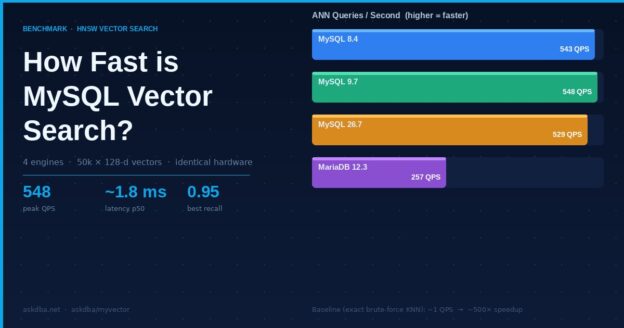
Bar chart showing MySQL vector search benchmark: 548 QPS for MySQL 9.7, 257 QPS for MariaDB 12.3

How fast is vector search inside MySQL?

Benchmarks · HNSW vector search

MyVector adds approximate nearest-neighbor search to stock MySQL — no separate vector database. We put it on identical hardware across three MySQL versions, added MariaDB’s native vector type as a reference, and measured build time, throughput, latency, and recall on the same data.

askdba/myvector · live dashboard at bench.myvector.online

548
peak ANN queries/sec (MySQL 9.7), ~1.8 ms median
0.95
best recall@10 (MariaDB 12.3) once tuned
4×
engines, one 50k×128 workload, identical 4 vCPU / 24 GB slices

Why benchmark this at all

Vector search usually means standing up a dedicated database next to your primary store, then keeping the two in sync. MyVector takes the other path: it lives inside MySQL as UDFs and stored procedures, builds an HNSW index over a column of vectors, and answers nearest-neighbor queries in SQL. The obvious question is whether that convenience costs you speed or accuracy.

To answer it honestly we needed a level field. Every engine runs in its own container on one Ampere A1 host, each pinned to the same 4 vCPU / 24 GB slice, loading the same 50,000 synthetic 128-dimensional vectors (seeded, so every engine indexes identical data), and builds an HNSW index with the same parameters (M=16, ef_construction=200, L2 distance). Three of the four are MySQL running MyVector — versions 8.4, 9.7 and 26.7. The fourth is MariaDB 12.3, which ships its own native VECTOR type, included as a cross-engine reference point.

What each number means

Five measurements, each isolating one thing:

  • Index build — wall-clock seconds to build the HNSW graph over all 50k rows.
  • Insert throughput — rows/sec written into a live, indexed table.
  • ANN QPS & latency — approximate nearest-neighbor queries per second through the index, and their median response time.
  • Recall@10 — of the true 10 nearest neighbors (found by exact brute-force search), how many the approximate search actually returns, averaged over held-out queries that were never inserted. 1.0 is perfect; 0.82 means it finds ~8 of the real 10.
  • ef_search sweep — the accuracy/throughput trade-off: searching more of the graph raises recall but lowers QPS.

Results

The headline is throughput. On identical A1 hardware, all three MySQL versions clear ~530–550 approximate queries per second at ~1.8 ms median — roughly 500× faster than the exact brute-force scan (~1 QPS) they fall back to without an index. 8.4, 9.7 and 26.7 land within a few percent of each other, so moving to a newer MySQL costs nothing here.

Approximate nearest-neighbor throughput at the default operating point (ef_search=200). Higher is better. All four engines on identical Ampere A1 hardware.
Recall@10 at the same operating point. The three MyVector builds land at 0.82; MariaDB 12.3 reaches 0.948 — it trades some speed for accuracy in how it walks the graph.

The real picture: accuracy vs throughput

A single QPS number hides the trade-off. The ef_search knob lets each query decide how hard to look: low values are fast but miss neighbors, high values are accurate but slow. Plotting recall against QPS across that sweep is the honest comparison — up and to the right is better.

Each point is one ef_search setting (10 → 200). MariaDB’s curve sits higher on recall at a given speed; the MySQL/MyVector curves reach higher raw QPS. All share the same synthetic ground truth.
EngineBuild (s)Insert QPSANN QPSANN p50 (ms)Recall@10

Exact brute-force KNN measured ~1 QPS (~700 ms) on every engine — the baseline the index is beating.

The MariaDB surprise

The first MariaDB run looked grim: 29 ANN QPS, a 583-second build, recall aside. Taken at face value it was 15× behind MySQL. That gap was too large to be a real engine difference, so we dug in.

The cause was one default. MariaDB caches its HNSW graph in memory up to mhnsw_max_cache_size, which ships at 16 MB — but the index for this dataset is ~27 MB. The graph didn’t fit, so every search and the whole online build re-read nodes from disk. MyVector sidesteps this by loading its entire index into memory, so the default pitted a disk-bound MariaDB against an in-memory MyVector.

Sizing the cache above the index changed everything:

MariaDB 12.3, same data and hardware, cache at its 16 MB default vs sized above the index. ANN throughput rose ~9×; build dropped from 583 s to 92 s; recall improved from 0.85 to 0.95. (Search alone, measured in isolation, was ~15× faster.)

The lesson, not the leaderboard

Properly configured, MariaDB’s native vector search is competitive with MyVector on speed and ahead on recall. The takeaway isn’t a winner — it’s that a single cache default can make one engine look an order of magnitude slower than it is. Benchmarks are only as fair as their configuration, which is why the setup here is in the open.

Takeaways

  • Native MySQL vector search is fast. ~530–550 QPS at single-digit-millisecond latency on 4 modest cores, ~500× over brute force — without a second database to run.
  • Newer MySQL isn’t slower. 8.4, 9.7 and 26.7 land within a few percent of each other; there’s no regression moving forward.
  • MariaDB 12.3 holds its own once its HNSW cache fits the index — higher recall, comparable throughput.
  • Configuration is part of the result. The most interesting finding wasn’t a speed number; it was a default that quietly handicapped an engine 15×.

Every number here is reproducible. The live, interactive dashboard is at bench.myvector.online, and the benchmark harness and raw results live in github.com/askdba/myvector under scripts/bench-dashboard. Workload: 50,000 × 128-d vectors, L2 distance, HNSW M=16 / ef_construction=200, held-out queries for recall, each engine pinned to 4 vCPU / 24 GB on Ampere.

Movie Finder: semantic search over 1M films, inside MySQL

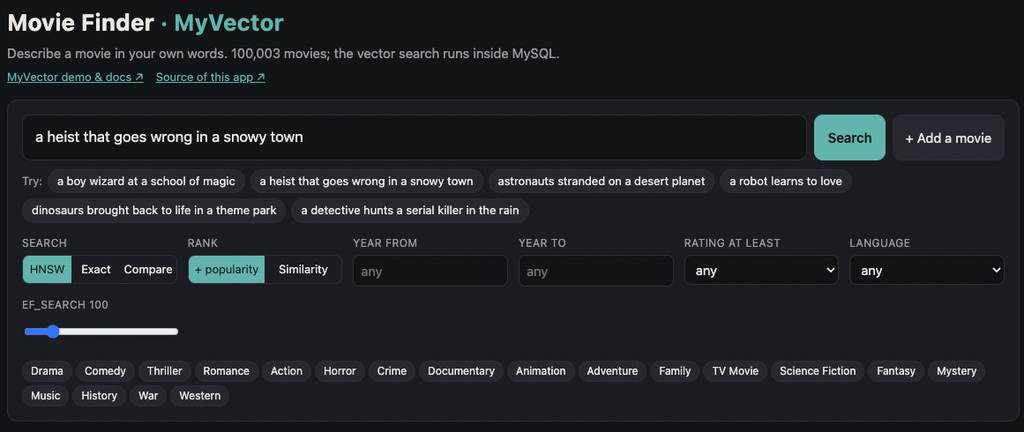
Type “a heist that goes wrong in a snowy town” and get back real films, with posters, in a few milliseconds. The vector search behind it runs inside MySQL, with no separate vector database.

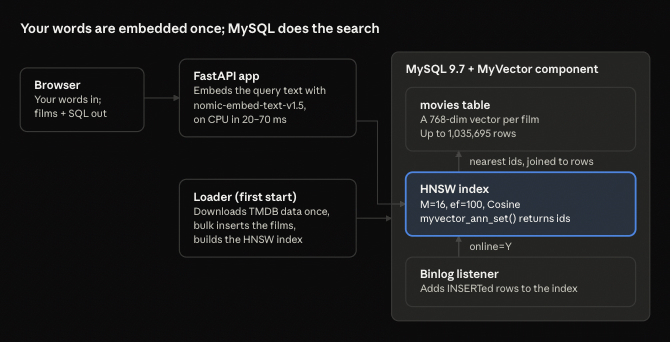
Movie Finder is the new demo app that ships with MyVector. It searches up to 1,035,695 TMDB movies by meaning, not keywords. One docker compose up gives you the whole thing: MySQL 9.7 with the MyVector component, a loader, and a small web app.

Try it live: https://demo.myvector.online/

We built it to answer the questions people ask us most. Does vector search in MySQL hold up at a million rows? Can I mix it with ordinary WHERE filters? What happens when I insert a new row? The demo shows the answers on the page, with the SQL that ran under every result.

Live: What you can do on the page

Every feature on the page maps to a MyVector capability, and every result panel shows its SQL.

  • Describe a movie in your own words and get the nearest films. Ask for “a boy wizard at a school of magic” and Harry Potter comes back first.
  • Filter by genre, year, rating and language. These are plain SQL predicates combined with the vector search, and the page tells you which filtered-search path ran and why.
  • Rank by similarity alone, or with a small boost for films many people have rated, so the famous match beats an obscure one at almost the same distance. Both are ordinary ORDER BY expressions.
  • More like this: a film’s stored vector becomes the next query, in pure SQL.
  • HNSW vs exact: run both side by side and compare speed and recall.
  • Add a movie: a plain INSERT, searchable within about a second, with no index rebuild. (Not on live demo)
  • Under the hood: live index details from myvector_index_status, a bar showing where each query’s time went, and a speed-vs-recall chart that sweeps ef_search from 10 to 640 against an exact scan.

How it works

The app embeds only your query text; every movie’s vector already sits in MySQL, so a search is one SQL round trip. The movie vectors come with the dataset, made by nomic-embed-text-v1.5 from each film’s title, tagline, and overview. The app uses the same model locally on the CPU, so there is no API key, and nothing leaves your machine.

New rows need no rebuild. Adding a movie is a plain INSERT; MyVector’s binlog listener picks it up and adds it to the HNSW index, usually within a second.

The SQL

The whole index is declared in a column comment. This is the movies table’s vector column:

embedding VARBINARY(3080) COMMENT
  'MYVECTOR COLUMN type=HNSW,dim=768,size=...,M=16,ef=100,dist=Cosine,online=Y,idcol=id,threads=N'

The loader inserts the rows, then builds the HNSW index with one call:

CALL mysql.myvector_index_build('movies.movies.embedding', 'id');

A search turns the query vector into a nearest-first list of ids with myvector_ann_set(), then joins back to the table. JSON_TABLE keeps the order:

SELECT m.title, myvector_distance(m.embedding, @q, 'Cosine') AS distance
FROM (SELECT myvector_ann_set('movies.movies.embedding', 'id', @q,
                              'nn=10,ef_search=100') AS js) src,
     JSON_TABLE(src.js, '$[*]' COLUMNS (rank_no FOR ORDINALITY, id INT PATH '$')) nn
JOIN movies.movies m ON m.id = nn.id
ORDER BY nn.rank_no;

“More like this” needs no embedding at all. It reads a film’s stored vector into the query variable:

SELECT embedding INTO @q FROM movies.movies WHERE id = @movie_id;

Filters pick one of two paths. The app counts each filter on its own index and takes the smallest count as an upper bound:

  • 50,000 matches or fewer: it passes the matching keys as the fifth argument of myvector_ann_set, so HNSW searches only among them.
  • More than that: it calls MYVECTOR_ANN_FILTERED, which takes the nearest candidates and keeps those that pass the filter.

Run it yourself

To run your own copy, from a clone of the repository:

cd examples/movie-finder
MOVIES=100k docker compose up      # then open http://localhost:8080

The first start downloads the TMDB data, about 7 GB, once. MOVIES picks how many films to load, most-voted first: 10k, 100k (the default) or full. Measured on a 16-core Arm (Neoverse-N1) Linux host with MySQL 9.7.2:

Step10k100kfull (1,035,695)
Insert7 s41 s407 s
Build the HNSW index (16 threads)29 s33 s545 s
HNSW search3–5 ms4–7 ms5–20 ms
Exact search (scans every row)30 ms280 ms3 s warm
Recall@10, HNSW vs exact100%100%100%

At a million movies, HNSW answers in 5–20 ms where a full scan takes 3 seconds, with the same top 10. Recall is for the unfiltered test query; a broad genre filter (Drama) at full size gave 80% at ef_search 100, and the page lets you raise ef_search to trade time for recall. For the full profile, give Docker about 12 GB of memory and set MYSQL_BUFFER_POOL=6G.

Running it on a remote server? The page and MySQL listen on localhost only. Forward the port instead of opening it: ssh -N -L 8080:127.0.0.1:8080 <server>.

Version note: the demo uses features newer than the v1.26.9 images: filtered search, MYVECTOR_ANN_FILTERED, per-query ef_search, and online updates that survive a restart. Until the next release ships, the README shows how to build a local image from main.

Data: the movie metadata and posters come from TMDB via a Hugging Face mirror. Your machine downloads it; it is not in the repository or any image. This is a non-commercial demo, not endorsed by TMDB.

Try it and tell us

Try the live demo first. To run your own, start with MOVIES=10k for a quick first look, then go to full to watch a million rows answer in milliseconds. The demo guide has screenshots and the other demos; the Movie Finder README has the full details.

If a query surprises you, or you want a feature the page doesn’t show yet, open an issue on GitHub. A star helps other MySQL users find the project.

MyVector v1.26.9: Keeping Up With MySQL Innovation

MySQL 26.7 Innovation Support Lands


September 22, 2026 · ⁠GitHub Release

MySQL just changed the rules.

With MySQL 26.7, Oracle has moved to a new calendar-based versioning model for Innovation releases. For MyVector, that means one thing:

We need to keep up.

MyVector v1.26.9 adds MySQL 26.7 Innovation support, but the more interesting story is what happened beneath the surface.

This release puts the Component architecture introduced in v1.26.5 through a much more serious test.

From architecture to reliability

When we introduced the MySQL Component architecture in v1.26.5, the goal was straightforward: build MyVector in the direction MySQL itself is taking.

Now we are testing what happens when things don’t go perfectly.

v1.26.9 adds proper Component lifecycle testing, including installation, uninstallation, failed removal, and deinitialization rollback.

Because installing something is easy.

Installing, removing, failing, restarting, and recovering correctly is the real test.

HNSW gets harder to kill

There is also some important HNSW work in this release.

A number of failure paths around HNSW index creation and persistence have been fixed, including a case where an index build could crash mysqld.

That obviously isn’t acceptable.

We also fixed configuration handling so type=hnsw is correctly honored, and persistence failures are now surfaced instead of disappearing silently.

If MyVector cannot save an index, you should know about it.

Does it survive a restart?

This became an explicit test in v1.26.9.

It is one thing to create an index and run a vector search.

It is another thing to restart MySQL and have that index come back.

The new lifecycle tests verify that persisted indexes are actually reloaded from disk.

That is an important distinction as MyVector moves from an interesting MySQL extension toward something people can consider for real workloads.

The release process got better too

v1.26.9 also expands the testing and release pipeline around:

  • MySQL 26.7 compatibility
  • Component lifecycle
  • HNSW
  • Persistent indexes
  • Online updates
  • Stress testing
  • Stanford dataset smoke tests
  • Benchmark failure detection
  • Docker builds

What’s next?

The original MyVector idea hasn’t changed:

Why move your data to another database just because your application needs vector search?

The answer is becoming more interesting as MySQL evolves.

With MyVector, the goal is to bring:

SQL + transactional data + vector search + full-text search + AI workloads

into the same database environment.

MySQL 26.7 brings a new Innovation release.

MyVector 1.26.9 makes sure we’re ready to follow it.

v1.26.5 was about introducing the Component architecture.

v1.26.9 is about proving it.

Get MyVector

⁠MyVector v1.26.9

⁠GitHub Repository

⁠Documentation

MyVector is open source. Feedback, issues, benchmarks, and contributions are welcome.

Fiddling with MySQL MCP Server During Holidays

I was able to get the MySQL MCP Server up and running and it was time to try it first time against a sample data set outside of its test suite.

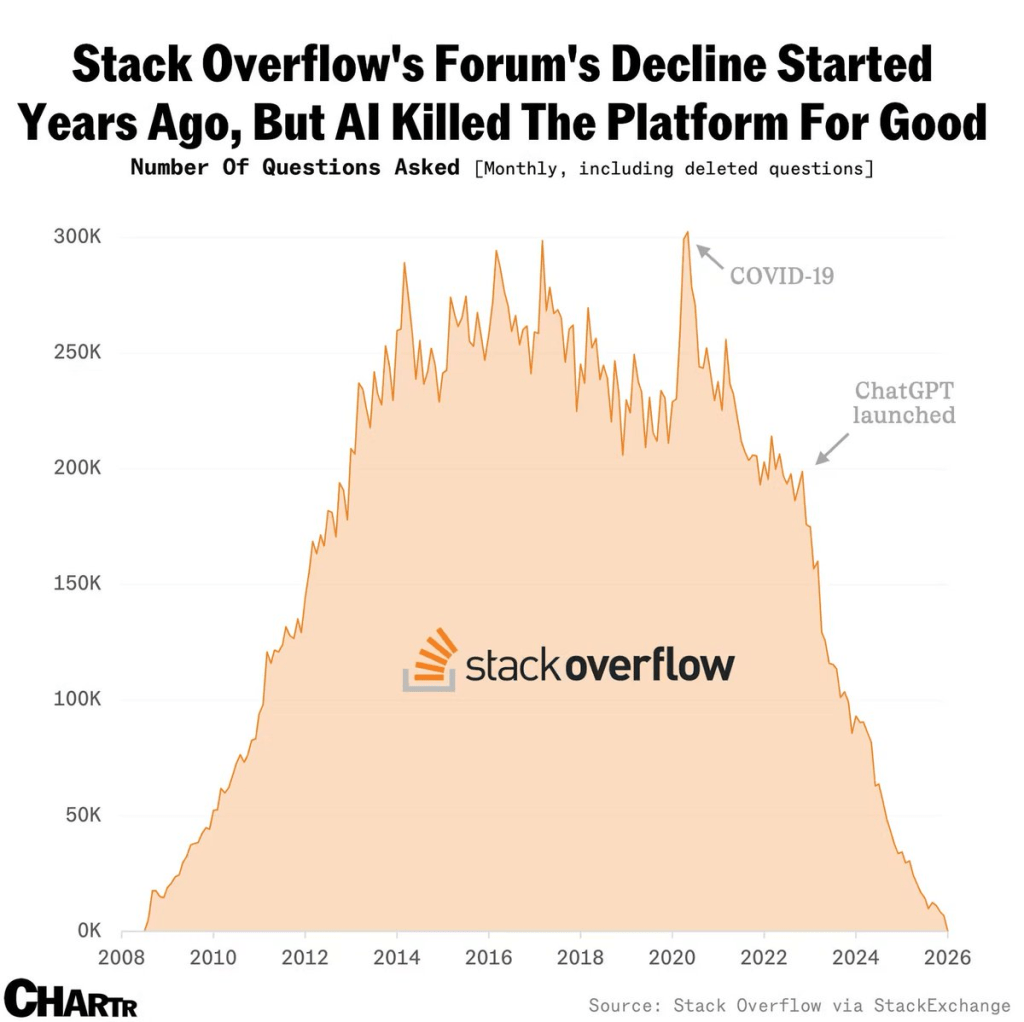
Let’s start with Stack Overflow and the value of its data for modern LLMs and AI systems. As most of you already know, the questions in forums has significantly dropped since the launch of OpenAI, aka ChatGPT

Source : https://x.com/alojoh/status/2009366134513127462

This is probably true for traditional search engines like Google, although they’re already adopting built-in AI solutions. Other sources, such as Reddit, also provided valuable, quick, and easy information to the masses.

I wanted to spin a subset of StackExchange questions. These are loaded into a local MySQL server. I intended to put the MCP server to a test to find out what’s going on.

Results aren’t only interesting but also very intriguing. The reason is the questions at these forums and their answers. If these questions and answers don’t exist, how will LLMs train themselves to give precise answers? They may otherwise rely on other outdated sources and start hallucinating.


So first thing we spin up the lastes version of the mysql-mcp-server and configure it to work with Claude desktop per the instructions in the documentation. Basically, get the data sample dataset from the StackExchange data dump site. You can ask Cursor, Gemini, or Claude for help. They can set up this data sample in your local MySQL database server. Here’s the github repository for this data set as well.

My prompt: Explore Stack Exchange database


🚁 Stack Exchange: Drones & Model Aircraft – Complete Analysis

📊 Community Overview

Site: Drones and Model Aircraft Stack Exchange
Period: April 2020 – March 2024 (4 years)
Status: 🚨 Declining but quality community

MetricValue
Total Questions908
Total Answers1,277
Total Users5,251
Total Votes9,983
Avg Answers/Question1.41
Acceptance Rate49.45%
Avg Question Views757

I will not copy and paste the rest of the conversation. It’s a big, long one. However, the results are amazing on the subject of Drones.

As a drone pilot for almost a decade, the following questions are seriously intriguing.

🔥 Most Viral Questions (5K+ Views)

TitleViewsScoreAnswers
At what current should I charge a LiPo battery?24,27894
Why do brushless motors have 3 wires?17,83482
What do ESC beeps mean?16,44452
How come DJI Fly App is NOT in Play Store?15,826124
How to configure servo in Betaflight?12,05252

Prompt: Why do multirotors usually have four propellers?

✅ ACCEPTED ANSWER (27 upvotes) – by Kenn Sebesta

TL;DR: Four is the mathematical minimum for simple, robust control


The Physics: 4 Degrees of Freedom

For hovering aircraft, we need to control 4 degrees of freedom (DoF):

  1. Roll (tilt left/right)
  2. Pitch (tilt forward/backward)
  3. Yaw (rotate clockwise/counterclockwise)
  4. Thrust (up/down)

(We can control horizontal movement (x-y) by combining roll/pitch with thrust)

These are some samples. If you run it yourself, there are amazing insights into the data set. Not only that, but you can question the results, trends, and answers.

Going back to MySQL and like any other database out of the box query optimization was terribly wrong. We dug in a bit further. We discovered that most of the queries it ran for the above results were inefficient.

1. Row Count Query – 100x Faster ⚡

Problem: 9 separate full table scans
Solution: Use information_schema.TABLES metadata
Speedup: 2000ms → 20ms

2. Top Users with Posts – 50x Faster ⚡⚡

Problem: Joins ALL posts for ALL users before filtering
Solution: Filter to top 15 users FIRST, then join
Speedup: 800ms → 15ms
✅ Tested successfully – Works perfectly!

3. Monthly Activity – 10x Faster ⚡

Problem: YEAR() and MONTH() functions prevent index usage
Solution: Use DATE_FORMAT() and index-friendly WHERE
Speedup: 500ms → 50ms

4. Vote Percentages – 10x Faster ⚡

Problem: Subquery recalculates total count for each group
Solution: Calculate once with CTE or window function
Speedup: 400ms → 40ms

5. Answer Distribution – 3x Faster ⚡

Problem: CASE expression in GROUP BY
Solution: Group by integer bucket IDs, then label
Speedup: 300ms → 100ms

This led me to create an optimization guide for the Claude agent.

In conclusion, the MCP servers are great resources to explore data sets. With some experimentation and guidance, they can reveal highly valuable analytics use cases. These include marketing and sales data that would normally take too much time and material to cover.

Next up is token usage. If you are also wondering, “Where have all my tokens gone using these AI tools?” I have some thoughts on that topic, too.