Tag Archives: myvector

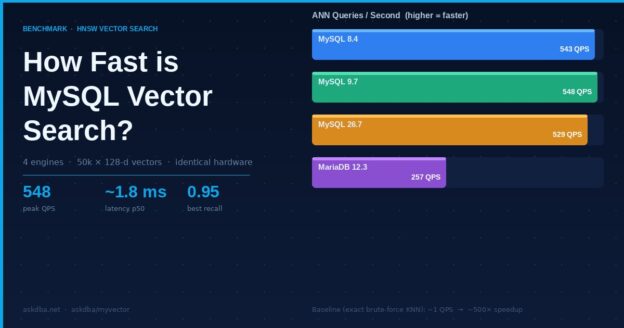
Bar chart showing MySQL vector search benchmark: 548 QPS for MySQL 9.7, 257 QPS for MariaDB 12.3

How fast is vector search inside MySQL?

Benchmarks · HNSW vector search

MyVector adds approximate nearest-neighbor search to stock MySQL — no separate vector database. We put it on identical hardware across three MySQL versions, added MariaDB’s native vector type as a reference, and measured build time, throughput, latency, and recall on the same data.

askdba/myvector · live dashboard at bench.myvector.online

548
peak ANN queries/sec (MySQL 9.7), ~1.8 ms median
0.95
best recall@10 (MariaDB 12.3) once tuned
4×
engines, one 50k×128 workload, identical 4 vCPU / 24 GB slices

Why benchmark this at all

Vector search usually means standing up a dedicated database next to your primary store, then keeping the two in sync. MyVector takes the other path: it lives inside MySQL as UDFs and stored procedures, builds an HNSW index over a column of vectors, and answers nearest-neighbor queries in SQL. The obvious question is whether that convenience costs you speed or accuracy.

To answer it honestly we needed a level field. Every engine runs in its own container on one Ampere A1 host, each pinned to the same 4 vCPU / 24 GB slice, loading the same 50,000 synthetic 128-dimensional vectors (seeded, so every engine indexes identical data), and builds an HNSW index with the same parameters (M=16, ef_construction=200, L2 distance). Three of the four are MySQL running MyVector — versions 8.4, 9.7 and 26.7. The fourth is MariaDB 12.3, which ships its own native VECTOR type, included as a cross-engine reference point.

What each number means

Five measurements, each isolating one thing:

  • Index build — wall-clock seconds to build the HNSW graph over all 50k rows.
  • Insert throughput — rows/sec written into a live, indexed table.
  • ANN QPS & latency — approximate nearest-neighbor queries per second through the index, and their median response time.
  • Recall@10 — of the true 10 nearest neighbors (found by exact brute-force search), how many the approximate search actually returns, averaged over held-out queries that were never inserted. 1.0 is perfect; 0.82 means it finds ~8 of the real 10.
  • ef_search sweep — the accuracy/throughput trade-off: searching more of the graph raises recall but lowers QPS.

Results

The headline is throughput. On identical A1 hardware, all three MySQL versions clear ~530–550 approximate queries per second at ~1.8 ms median — roughly 500× faster than the exact brute-force scan (~1 QPS) they fall back to without an index. 8.4, 9.7 and 26.7 land within a few percent of each other, so moving to a newer MySQL costs nothing here.

Approximate nearest-neighbor throughput at the default operating point (ef_search=200). Higher is better. All four engines on identical Ampere A1 hardware.
Recall@10 at the same operating point. The three MyVector builds land at 0.82; MariaDB 12.3 reaches 0.948 — it trades some speed for accuracy in how it walks the graph.

The real picture: accuracy vs throughput

A single QPS number hides the trade-off. The ef_search knob lets each query decide how hard to look: low values are fast but miss neighbors, high values are accurate but slow. Plotting recall against QPS across that sweep is the honest comparison — up and to the right is better.

Each point is one ef_search setting (10 → 200). MariaDB’s curve sits higher on recall at a given speed; the MySQL/MyVector curves reach higher raw QPS. All share the same synthetic ground truth.
EngineBuild (s)Insert QPSANN QPSANN p50 (ms)Recall@10

Exact brute-force KNN measured ~1 QPS (~700 ms) on every engine — the baseline the index is beating.

The MariaDB surprise

The first MariaDB run looked grim: 29 ANN QPS, a 583-second build, recall aside. Taken at face value it was 15× behind MySQL. That gap was too large to be a real engine difference, so we dug in.

The cause was one default. MariaDB caches its HNSW graph in memory up to mhnsw_max_cache_size, which ships at 16 MB — but the index for this dataset is ~27 MB. The graph didn’t fit, so every search and the whole online build re-read nodes from disk. MyVector sidesteps this by loading its entire index into memory, so the default pitted a disk-bound MariaDB against an in-memory MyVector.

Sizing the cache above the index changed everything:

MariaDB 12.3, same data and hardware, cache at its 16 MB default vs sized above the index. ANN throughput rose ~9×; build dropped from 583 s to 92 s; recall improved from 0.85 to 0.95. (Search alone, measured in isolation, was ~15× faster.)

The lesson, not the leaderboard

Properly configured, MariaDB’s native vector search is competitive with MyVector on speed and ahead on recall. The takeaway isn’t a winner — it’s that a single cache default can make one engine look an order of magnitude slower than it is. Benchmarks are only as fair as their configuration, which is why the setup here is in the open.

Takeaways

  • Native MySQL vector search is fast. ~530–550 QPS at single-digit-millisecond latency on 4 modest cores, ~500× over brute force — without a second database to run.
  • Newer MySQL isn’t slower. 8.4, 9.7 and 26.7 land within a few percent of each other; there’s no regression moving forward.
  • MariaDB 12.3 holds its own once its HNSW cache fits the index — higher recall, comparable throughput.
  • Configuration is part of the result. The most interesting finding wasn’t a speed number; it was a default that quietly handicapped an engine 15×.

Every number here is reproducible. The live, interactive dashboard is at bench.myvector.online, and the benchmark harness and raw results live in github.com/askdba/myvector under scripts/bench-dashboard. Workload: 50,000 × 128-d vectors, L2 distance, HNSW M=16 / ef_construction=200, held-out queries for recall, each engine pinned to 4 vCPU / 24 GB on Ampere.
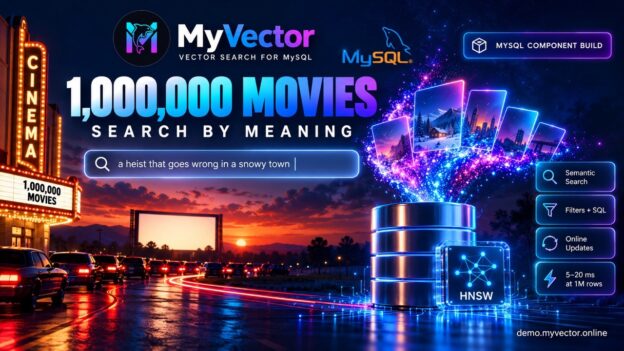
Movie Finder: semantic search over 1M films, inside MySQL

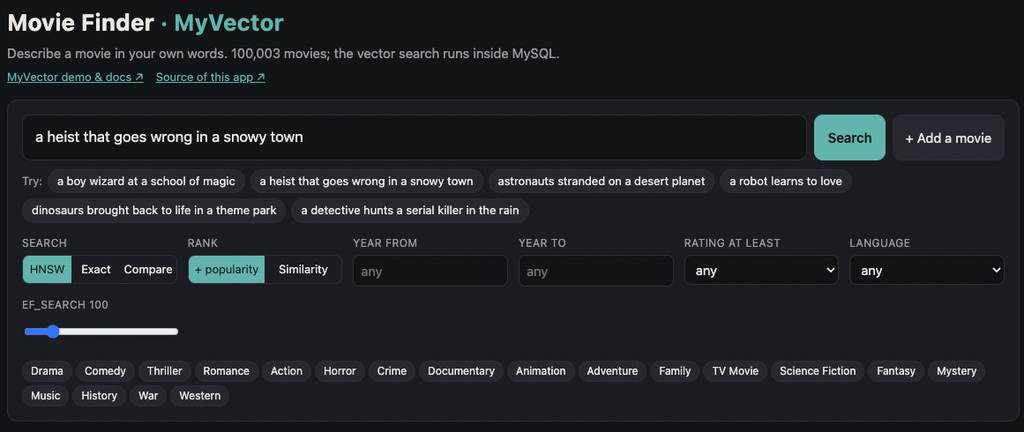
Type “a heist that goes wrong in a snowy town” and get back real films, with posters, in a few milliseconds. The vector search behind it runs inside MySQL, with no separate vector database.

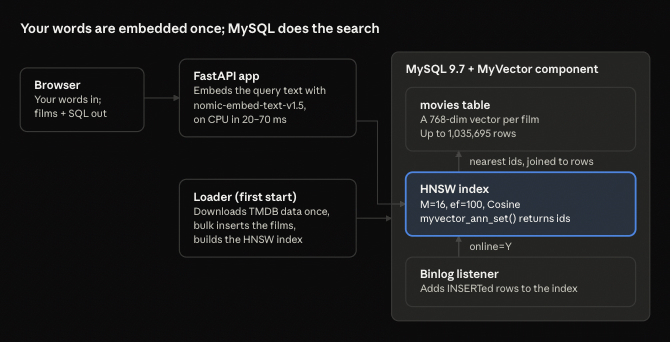
Movie Finder is the new demo app that ships with MyVector. It searches up to 1,035,695 TMDB movies by meaning, not keywords. One docker compose up gives you the whole thing: MySQL 9.7 with the MyVector component, a loader, and a small web app.

Try it live: https://demo.myvector.online/

We built it to answer the questions people ask us most. Does vector search in MySQL hold up at a million rows? Can I mix it with ordinary WHERE filters? What happens when I insert a new row? The demo shows the answers on the page, with the SQL that ran under every result.

Live: What you can do on the page

Every feature on the page maps to a MyVector capability, and every result panel shows its SQL.

  • Describe a movie in your own words and get the nearest films. Ask for “a boy wizard at a school of magic” and Harry Potter comes back first.
  • Filter by genre, year, rating and language. These are plain SQL predicates combined with the vector search, and the page tells you which filtered-search path ran and why.
  • Rank by similarity alone, or with a small boost for films many people have rated, so the famous match beats an obscure one at almost the same distance. Both are ordinary ORDER BY expressions.
  • More like this: a film’s stored vector becomes the next query, in pure SQL.
  • HNSW vs exact: run both side by side and compare speed and recall.
  • Add a movie: a plain INSERT, searchable within about a second, with no index rebuild. (Not on live demo)
  • Under the hood: live index details from myvector_index_status, a bar showing where each query’s time went, and a speed-vs-recall chart that sweeps ef_search from 10 to 640 against an exact scan.

How it works

The app embeds only your query text; every movie’s vector already sits in MySQL, so a search is one SQL round trip. The movie vectors come with the dataset, made by nomic-embed-text-v1.5 from each film’s title, tagline, and overview. The app uses the same model locally on the CPU, so there is no API key, and nothing leaves your machine.

New rows need no rebuild. Adding a movie is a plain INSERT; MyVector’s binlog listener picks it up and adds it to the HNSW index, usually within a second.

The SQL

The whole index is declared in a column comment. This is the movies table’s vector column:

embedding VARBINARY(3080) COMMENT
  'MYVECTOR COLUMN type=HNSW,dim=768,size=...,M=16,ef=100,dist=Cosine,online=Y,idcol=id,threads=N'

The loader inserts the rows, then builds the HNSW index with one call:

CALL mysql.myvector_index_build('movies.movies.embedding', 'id');

A search turns the query vector into a nearest-first list of ids with myvector_ann_set(), then joins back to the table. JSON_TABLE keeps the order:

SELECT m.title, myvector_distance(m.embedding, @q, 'Cosine') AS distance
FROM (SELECT myvector_ann_set('movies.movies.embedding', 'id', @q,
                              'nn=10,ef_search=100') AS js) src,
     JSON_TABLE(src.js, '$[*]' COLUMNS (rank_no FOR ORDINALITY, id INT PATH '$')) nn
JOIN movies.movies m ON m.id = nn.id
ORDER BY nn.rank_no;

“More like this” needs no embedding at all. It reads a film’s stored vector into the query variable:

SELECT embedding INTO @q FROM movies.movies WHERE id = @movie_id;

Filters pick one of two paths. The app counts each filter on its own index and takes the smallest count as an upper bound:

  • 50,000 matches or fewer: it passes the matching keys as the fifth argument of myvector_ann_set, so HNSW searches only among them.
  • More than that: it calls MYVECTOR_ANN_FILTERED, which takes the nearest candidates and keeps those that pass the filter.

Run it yourself

To run your own copy, from a clone of the repository:

cd examples/movie-finder
MOVIES=100k docker compose up      # then open http://localhost:8080

The first start downloads the TMDB data, about 7 GB, once. MOVIES picks how many films to load, most-voted first: 10k, 100k (the default) or full. Measured on a 16-core Arm (Neoverse-N1) Linux host with MySQL 9.7.2:

Step10k100kfull (1,035,695)
Insert7 s41 s407 s
Build the HNSW index (16 threads)29 s33 s545 s
HNSW search3–5 ms4–7 ms5–20 ms
Exact search (scans every row)30 ms280 ms3 s warm
Recall@10, HNSW vs exact100%100%100%

At a million movies, HNSW answers in 5–20 ms where a full scan takes 3 seconds, with the same top 10. Recall is for the unfiltered test query; a broad genre filter (Drama) at full size gave 80% at ef_search 100, and the page lets you raise ef_search to trade time for recall. For the full profile, give Docker about 12 GB of memory and set MYSQL_BUFFER_POOL=6G.

Running it on a remote server? The page and MySQL listen on localhost only. Forward the port instead of opening it: ssh -N -L 8080:127.0.0.1:8080 <server>.

Version note: the demo uses features newer than the v1.26.9 images: filtered search, MYVECTOR_ANN_FILTERED, per-query ef_search, and online updates that survive a restart. Until the next release ships, the README shows how to build a local image from main.

Data: the movie metadata and posters come from TMDB via a Hugging Face mirror. Your machine downloads it; it is not in the repository or any image. This is a non-commercial demo, not endorsed by TMDB.

Try it and tell us

Try the live demo first. To run your own, start with MOVIES=10k for a quick first look, then go to full to watch a million rows answer in milliseconds. The demo guide has screenshots and the other demos; the Movie Finder README has the full details.

If a query surprises you, or you want a feature the page doesn’t show yet, open an issue on GitHub. A star helps other MySQL users find the project.

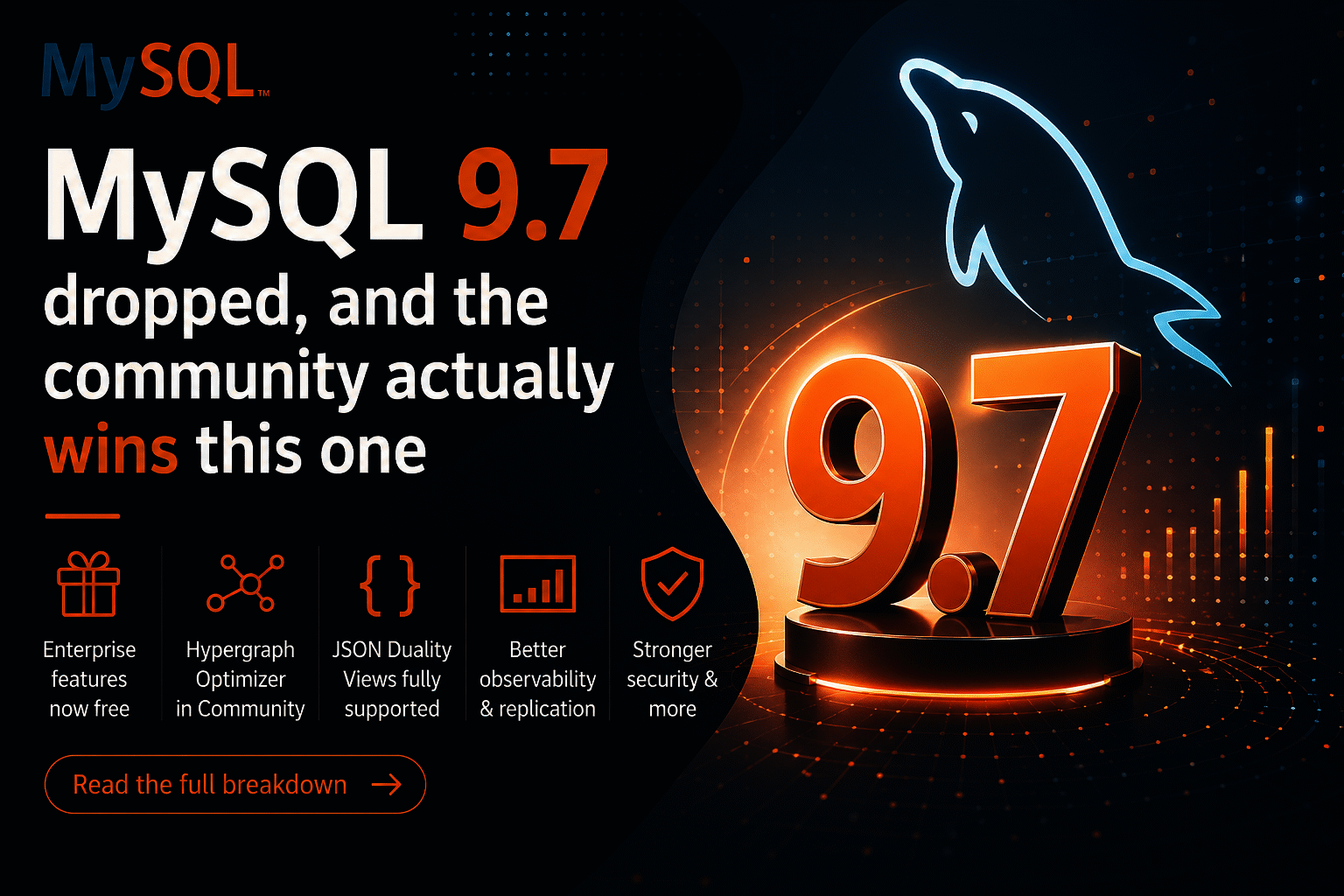
MySQL 9.7 is out and the community wins 

May 2026 · 5 min read. Alkin Tezuysal

Cross blog from Oracle https://blogs.oracle.com/mysql/mysql-9-7-is-out-and-the-community-wins

MySQL 9.7 came out on April 21 and I’ve been going through the release notes so you don’t have to. The short version: Oracle has made several previously Enterprise-only features available in the Community Edition; the Hypergraph Optimizer is now free for everyone; and if you’re still on MySQL 8.0, it has reached End-of-Life. Like right now. We’ll get to that.

Let’s go through what matters most.

First: MySQL 8.0 has reached End-of-Life

MySQL 8.0.46 shipped alongside 9.7, and it is the last 8.0 release. As of April 2026, 8.0 is officially End-of-Life. No more security patches. No more bug fixes. Oracle’s release notes now encourage users to upgrade to MySQL 8.4 LTS or 9.7.

If you’re on 8.0 in production, you’ve got two paths. MySQL 8.4 LTS is the safest, most conservative upgrade with a well-trodden migration path from 8.0. MySQL 9.7 is if you want all the new stuff, including everything in this post. Either way, the clock has run out on 8.0. It is strongly recommended to plan your upgrade soon.

Some Enterprise features available in the Community Edition

This is the headline. Oracle has moved five components from Enterprise Edition into Community Edition with this release. For self-hosted MySQL users, this is genuinely good news.

Four of them are replication components that now ship in Community Edition.

Replication Applier Metrics gives you real visibility into how your replica is processing events. Lag monitoring, throughput, the works. This was always the kind of thing you had to implement separately or access the Enterprise Edition.

Group Replication Flow Control Statistics now provides visibility into why your GR cluster is throttling. If you’ve ever stared at a slow cluster and had no idea what was happening under the hood, this one’s for you.

Group Replication Resource Manager lets you control how resources get allocated so replication stops starving your app workloads.

Group Replication Primary Election gives better observability into failover behavior during primary elections, which is exactly when you most need to know what’s going on.

And then there’s the Telemetry component, which is big if you’re running MySQL in a cloud-native setup. Metrics and traces can now flow to Prometheus, OpenTelemetry, and whatever else your observability stack includes. This was Enterprise-only until today.

The Hypergraph Optimizer is in Community Edition now

This is the one that stands out as particularly impactful.

Quick background: MySQL’s traditional query optimizer uses a left-deep tree approach to figure out join order. Works fine for simple queries, but with complex multi-table joins it can miss a lot of better execution plans. The Hypergraph Optimizer takes a completely different approach. It models the whole query as a hypergraph and uses dynamic programming to search a much bigger space of possible plans.

If you’ve got complex reporting queries or anything with a lot of joins, it’s worth turning on and seeing what happens.

To try it:

SET optimizer_switch=’hypergraph_optimizer=on’;

You can set it at session scope (great for testing), globally, persistently across restarts, or hint it on a per-query basis. Start with session scope on your actual slow queries before you go global. The optimizer is solid, but you don’t want surprises in production.

JSON Duality Views are now fully supported in Community

Previously, in Community Edition, you could define JSON Duality Views, but couldn’t do INSERTs, UPDATEs, or DELETEs through them. That was an Enterprise thing. This capability is now available in Community Edition. Full DML is now in Community.

They also added auto-increment support for duality view inserts, which means you can stop manually wiring up primary keys:

INSERT INTO orders_view

VALUES (‘{“customer_id”: 42, “product_id”: 7, “quantity”: 3}’);

The order_id gets generated automatically. Small change, but it removes a real friction point if you’ve been experimenting with duality views.

A few other things worth knowing

Password hashing got stronger.caching_sha2_password now supports PBKDF2 with SHA-512 storage format. Your existing clients don’t need to change anything since this is server-side only, but it makes stored hashes significantly harder to brute-force. Worth noting if you’re in a compliance-heavy environment like PCI-DSS or HIPAA.

Rolling upgrades just got easier. There’s a new variable called replica_allow_higher_version_source that lets a lower-version replica connect to a higher-version primary. Practically, this means you can upgrade your primary first, verify everything looks good, and then roll through your replicas at your own pace instead of taking the whole fleet down at once.

Container users, this one’s for you. MySQL now correctly reads cpuset cgroup limits to figure out how many CPUs are actually available to it. If you’d constrained MySQL to 4 CPUs in Kubernetes, it might have been sizing its thread pools against all 32 host CPUs anyway. That’s fixed.

OpenSSL got bumped to 3.5.5. Not exciting, but good hygiene.

What about Vector search?

A lot of people are asking about this, and the current status is that it is not yet generally available. Oracle is clearly building toward native vector search across the 9.x innovation releases, and you can see pieces of the foundation being put in place. But 9.7 isn’t the release where it lands as something you can use. It’s on the roadmap, it’s coming, the team is looking for feedback, and it is expected in future releases.  As some of you know, I’m especially interested in vector features as a maintainer of the MyVector project. We’ve had a couple of calls with the engineering team to collaborate on this subject. This might be an area for community contributions. Please stay tuned. 

So, should you upgrade?

Your situationWhat to do
Still on MySQL 8.0Upgrade. It’s EOL. Pick 8.4 LTS or 9.7.
On 8.4 LTS, happy where you areNothing urgent. Track 9.7 for the LTS landing.
Running Group ReplicationTry the new components.
Complex JOIN-heavy queriesBenchmark the Hypergraph Optimizer.
Running MySQL in KubernetesThe cgroup CPU fix alone might be worth it.
Excited about vector searchNot yet. Watch this space.


MySQL 9.7 is available at dev.mysql.com/downloads. If you end up benchmarking the Hypergraph Optimizer or trying the new replication components, share your results. The community learns from real-world numbers a lot more than from release notes. Drop them in the MySQL Community Forums or tag #MySQL97.

v1.26.3

MyVector v1.26.3: Maintenance, CI, and Readiness for MySQL 9.7


In my recent series on Scoped Vector Search, we looked at the query patterns that make vector search a first-class citizen in MySQL. While the logic for those searches is now established, the infrastructure supporting them requires constant attention as the MySQL ecosystem moves toward its new release model.

Today, I’m announcing MyVector v1.26.3. This is a foundational release focused on environment compatibility and CI/CD robustness.

What’s in v1.26.3?

This release ensures that MyVector remains stable and buildable across the shifting landscape of MySQL Innovation and LTS releases.

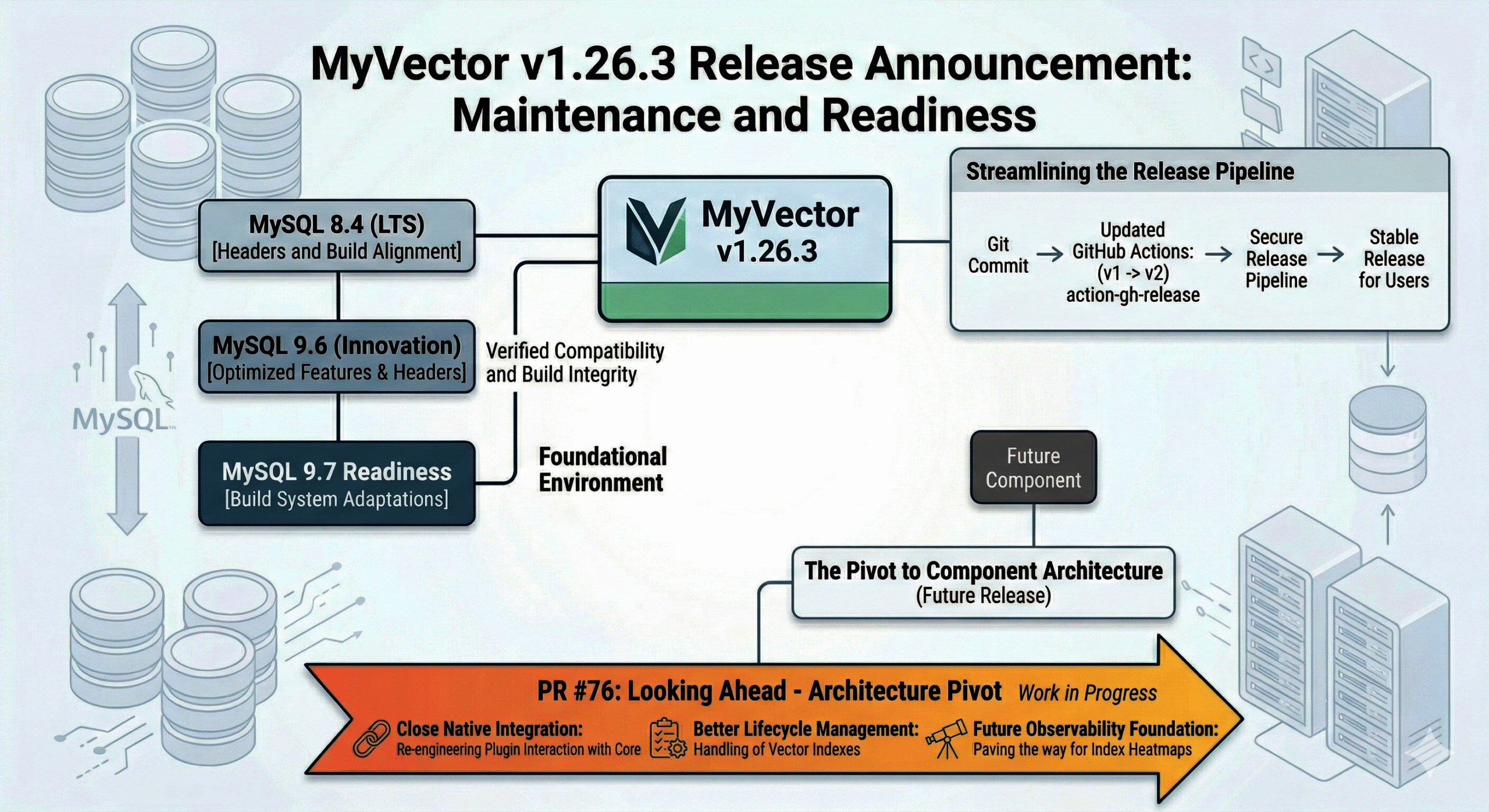
  • MySQL 8.4 & 9.6 Compatibility: We’ve updated the component sources and build logic to align with the headers and requirements for MySQL 8.4 (LTS) and the 9.6 Innovation release.
  • Ready for 9.7: The build system has been adapted to handle the upcoming 9.7 release, ensuring that users can transition to the next Innovation branch without delay.
  • Modernized Release Workflow: We’ve bumped our GitHub Actions (softprops/action-gh-release) from v1 to v2. While invisible to the user, this ensures our release pipeline remains secure and compatible with the latest GitHub runner environments.

Think of v1.26.3 as the “maintenance and readiness” layer that ensures the high-performance HNSW search you rely on continues to compile and run perfectly on the newest versions of MySQL.

Looking Ahead: The Architecture Pivot (PR #76)

While v1.26.3 keeps us current, the real excitement is happening in the lab.

There is a fundamental architecture change currently in development under Component migration (8.4–9.6) and release workflow update.

Unlike the compatibility fixes in today’s release, PR #76 is a structural overhaul. We are re-engineering how the plugin interacts with the MySQL core. This shift is designed to move MyVector closer to a full Component Architecture, which will eventually offer better lifecycle management and even deeper integration with MySQL’s internal services.

This is a significant pivot in how MyVector is built, and it will set the stage for the next generation of vector performance and observability.

Summary

v1.26.3 is the stable, verified update you need for today’s MySQL 8.4/9.6 environments and tomorrow’s 9.7 upgrade. Meanwhile, work continues on the architectural evolution that will define the future of the project.

Scoped Vector Search with the MyVector Plugin for MySQL – Part I


Semantic Search with SQL Simplicity and Operational Control

Introduction

Vector search is redefining how we work with unstructured and semantic data. Until recently, integrating it into traditional relational databases like MySQL required external services, extra infrastructure, or awkward workarounds. That changes with the MyVector plugin — a native vector indexing and search extension purpose-built for MySQL.

Whether you’re enhancing search for user-generated content, improving recommendation systems, or building AI-driven assistants, MyVector makes it possible to store, index, and search vector embeddings directly inside MySQL — with full support for SQL syntax, indexing, and filtering.

What Is MyVector?

The MyVector plugin adds native support for vector data types and approximate nearest neighbor (ANN) indexes in MySQL. It allows you to:

  • Define VECTOR(n) columns to store dense embeddings (e.g., 384-dim from BERT)
  • Index them using INDEX(column) VECTOR, which builds an HNSW-based structure
  • Run fast semantic queries using distance functions like L2_DISTANCE, COSINE_DISTANCE, and INNER_PRODUCT
  • Use full SQL syntax to filter, join, and paginate vector results alongside traditional columns

By leveraging HNSW, MyVector delivers millisecond-level ANN queries even with millions of rows — all from within MySQL.


Most importantly, it integrates directly into your existing MySQL setup—there is no new stack, no sync jobs, and no third-party dependencies.


Scoped Vector Search: The Real-World Requirement

In most production applications, you rarely want to search across all data. You need to scope vector comparisons to a subset — a single user’s data, a tenant’s records, or a relevant tag.

MyVector makes this easy by combining vector operations with standard SQL filters.

Under the Hood: HNSW and Query Performance

MyVector uses the HNSW algorithm for vector indexing. HNSW constructs a multi-layered proximity graph that enables extremely fast approximate nearest neighbor search with high recall. Key properties:

  • Logarithmic traversal through layers reduces search time
  • Dynamic index support: you can insert/update/delete vectors and reindex as needed
  • Configurable parameters like M and ef_search allow tuning for performance vs. accuracy

Under the Hood: HNSW and Query Performance

MyVector uses the HNSW algorithm for vector indexing. HNSW constructs a multi-layered proximity graph that enables extremely fast approximate nearest neighbor search with high recall. Key properties:

  • Fast ANN queries without external services
  • Scoped filtering before vector comparison
  • Logarithmic traversal through layers reduces search time
  • Dynamic index support: you can insert/update/delete vectors and reindex as needed
  • Configurable parameters like M and ef_search allow tuning for performance vs. accuracy

What’s Next

This post introduces the foundational concept of scoped vector search using MyVector and HNSW. In Part II, we’ll walk through practical schema design patterns, embedding workflows, and hybrid search strategies that combine traditional full-text matching with deep semantic understanding — using nothing but SQL.