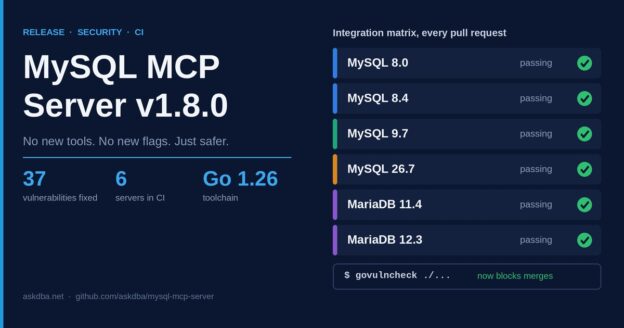
On paper it’s a boring release. No new tools, no new flags, nothing to reconfigure. In practice it’s one I’m glad I didn’t skip: it closes 37 known vulnerabilities that the server could actually reach, and I found them more or less by accident.
It started as a compatibility check
I had MySQL 8.4, 9.7 and 26.7 running on my test box, plus MariaDB 12.3. So I pointed the MCP server’s test suite at all of them. Mostly to tick a box before moving on to something more fun.
The code was fine. Every version passed.
MySQL 26.7 and MariaDB 12.3 join the matrix
Every pull request now runs the full integration suite against six servers:
- MySQL 8.0, 8.4, 9.7 and 26.7
- MariaDB 11.4 and 12.3
26.7 is the first Innovation release under Oracle’s new calendar versioning. If you follow MyVector, you know I’ve been chasing it there too.
MySQL 9.0 is out of CI. It was a short-lived Innovation release, and 9.7 covers that line now.
MySQL 8.0 is staying. Yes, it reached end of life in April. No, I’m not dropping it. Plenty of you are still on 8.0 and haven’t moved to 8.4 yet, and I’d rather keep testing it than pretend otherwise.
One more thing turned up along the way. The Sakila tests weren’t running in CI at all: the sample database was never loaded, so they skipped quietly. They run now, on every version.
Green CI, 37 vulnerabilities
CI was not fine. The vulnerability scan and the linter had been failing quietly for a while. Both were set to informational, so nothing ever turned red.
Once the scan ran again, it found 37 vulnerabilities in code the server actually calls. Most were in the Go 1.24 standard library, the rest in the SSH and MCP SDK dependencies.
v1.8.0 fixes all of them:
- Go 1.24 → 1.26
golang.org/x/cryptov0.43.0 → v0.58.0- MCP Go SDK v1.2.0 → v1.8.0
If you use the SSH tunnel: that library jumped 15 minor versions, so I tested it through a bastion before tagging. It still connects, and it still refuses a server whose host key doesn’t match known_hosts.
And since the release, govulncheck blocks merges and releases, so this can’t quietly happen again.
Release candidates stay out of Homebrew
This one’s a bit embarrassing. When I cut v1.7.1, all four release candidates went straight to the Homebrew tap. If you ran brew upgrade that week, you got an RC. Sorry about that.
RCs now only show up on the GitHub releases page. brew upgrade only ever gives you a final release.
v1.8.0 went out the new way. rc.1 first, smoke-tested against real 8.4, 9.7, 26.7 and MariaDB 12.3 servers, then the final tag. Homebrew users never saw the RC.
Things I learned the hard way
Two, mostly.
First, don’t write [skip ci] in a commit message. Not even when you’re describing a different commit that had it. GitHub doesn’t read for context. My PR sat there with no CI run at all while I wondered what was going on. With a required check on main now, that PR would have stayed stuck until I reworded the commit.
Second, the AI code reviewers earned their keep this time. CodeRabbit spotted a startup race in the CI health checks. Codex pointed out that scanning on Linux alone misses Windows-only code. And Copilot noticed that one of my test fixes would have broken the release workflow on the very first tag. I would have found that one at release time, which is the worst time to find anything.
Upgrading
Breaking change: building from source now needs Go 1.26 or later. Homebrew, Docker and the release binaries aren’t affected, and there’s nothing to reconfigure.
Homebrew:
brew update && brew upgrade mysql-mcp-serverDocker:
docker pull ghcr.io/askdba/mysql-mcp-server:1.8.0Or grab a binary from the v1.8.0 release. Here’s what my Mac said after brew upgrade:
$ mysql-mcp-server --version
mysql-mcp-server 1.8.0
  Build time: 2026-10-17T09:14:37Z
  Git commit: f946f1d37654b5d8958d45a027a3e68133f01d1a
The full list is in the CHANGELOG. Questions, bugs and ideas are welcome on GitHub.